¶ Formula Builder
For admins. This page shows how to add calculated fields to forms in the Form Builder. People filling in the form don't need to do anything: the results appear by themselves.
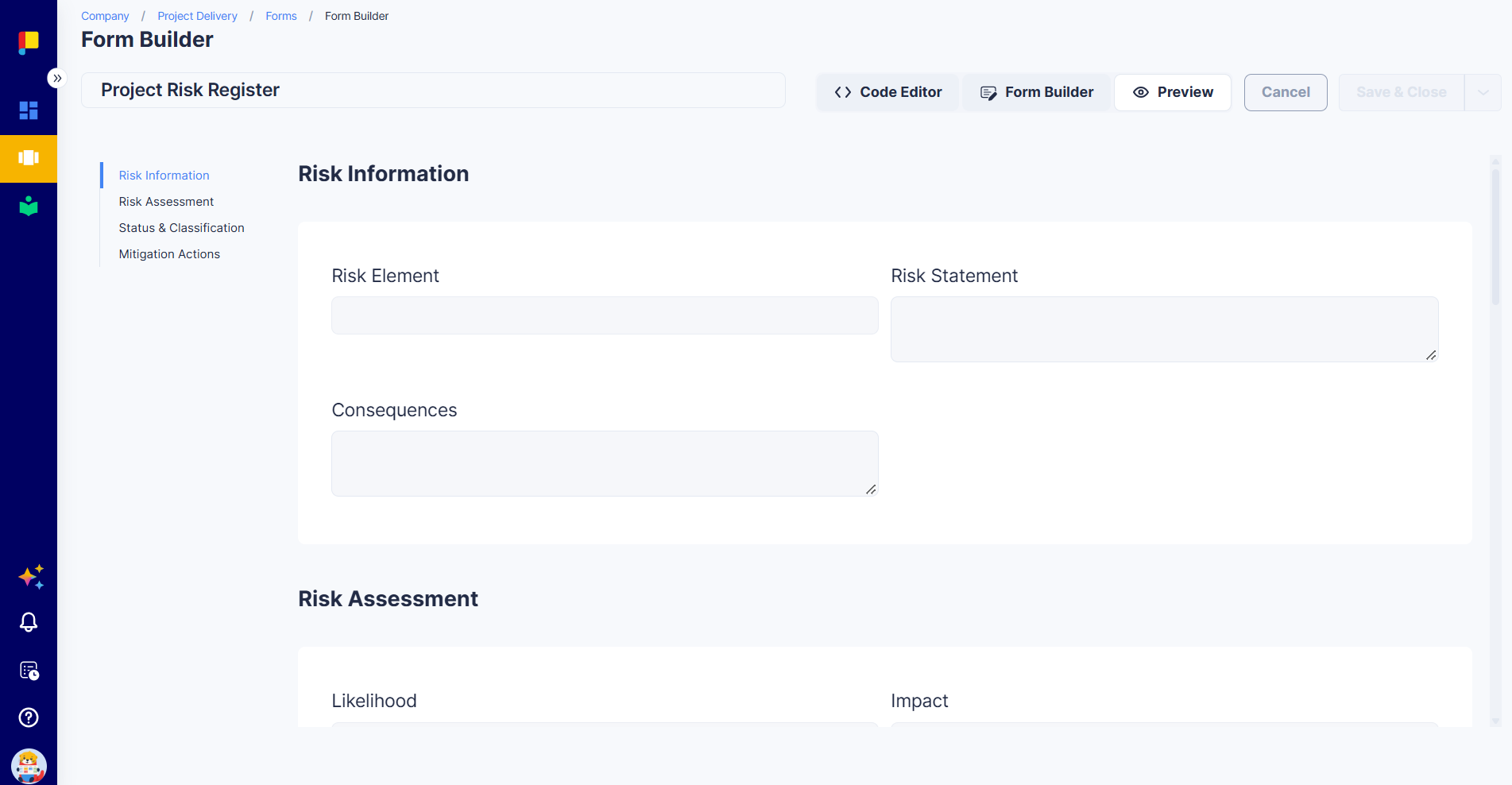
The Formula element turns a form into something that does the maths for you. A formula reads other fields in the same form and shows a result: a total, a score, a rating, a date, or a status. Because the result is calculated the same way every time, nobody has to work it out by hand, and nobody can type the wrong answer.
¶ Why This Matters
- One calculation, everywhere: every project uses the same formula, so ratings and totals are comparable.
- No manual maths: totals, scores, and dates are calculated as people fill in the form.
- Fewer errors: people can't overwrite a calculated result.
- Clear decisions: turn numbers into plain words, such as High, Overdue, or Complete.
¶ How Formulas Work: The Basics
- A formula reads other fields in the same form. It can't read other forms, other activities, or project details.
- A formula is read-only. People see the result; they can't type in it.
- The result updates as people fill in the form, and is saved when they click Save.
- If any field the formula needs is empty, the formula waits and shows - until it has everything.
There are two places you can add a formula:
| Where | What it calculates | Example |
|---|---|---|
| Formula element in the form | One result for the whole form | Amount Due, Risk Rating, Days Until Due |
| Formula column in an editable table | One result for each row | Line Total = Qty × Unit Price on every line |
¶ Add a Formula to a Form
¶ Steps
- Open the form in the Form Builder (Configuration → Projects → Forms).
- Add the fields your formula will read first (for example, Quantity and Unit Price). See What a Formula Can Read.
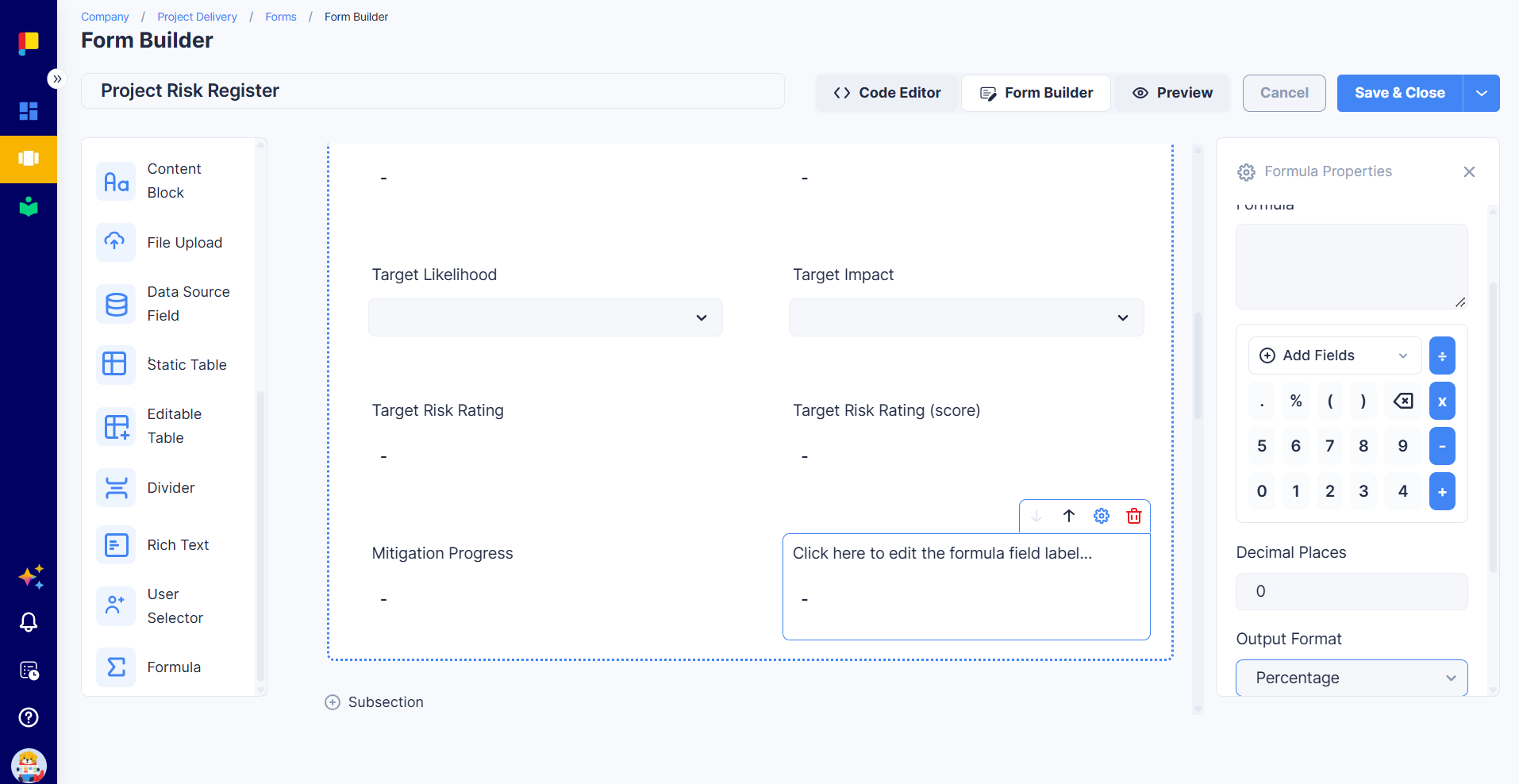
- Drag the Formula element from Form Elements onto the form, below the fields it reads.
- In the Properties panel:
- Label: the name people see, e.g. Amount Due.
- Formula: write the calculation (see Write the Formula).
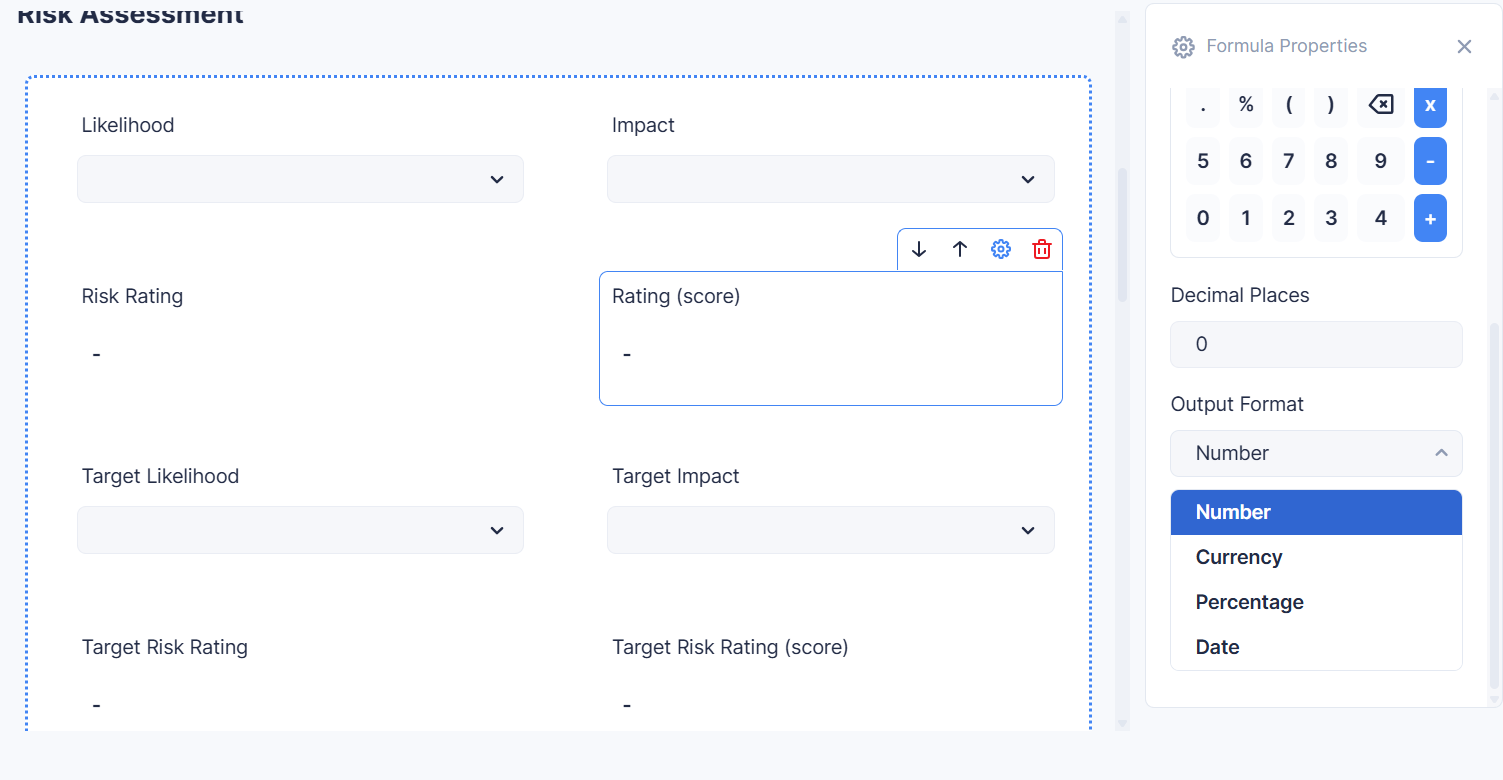
- Decimal Places: how many decimals to show (0 to 10; default 0).
- Output Format: how to show the result (see Choose How the Result Looks).
- Click Preview, fill in some test values, and check the result.
- Click Save & Close.
¶ Write the Formula
A formula is made of fields, numbers or text, operators (such as + and *), and functions (such as SUM or IF).
¶ Insert a field
- Type
$in the Formula box. A list of the fields you can use appears, grouped by section. Keep typing to filter it, then press Enter or click a field. - Or click Add Fields and pick from the list.
The field appears as a chip with its label. To remove it, click the × on the chip.
In the examples on this page, a field you insert is written as
$Field Name, e.g.$Quantity * $Unit Price. In the editor it appears as a chip.
¶ Insert a function
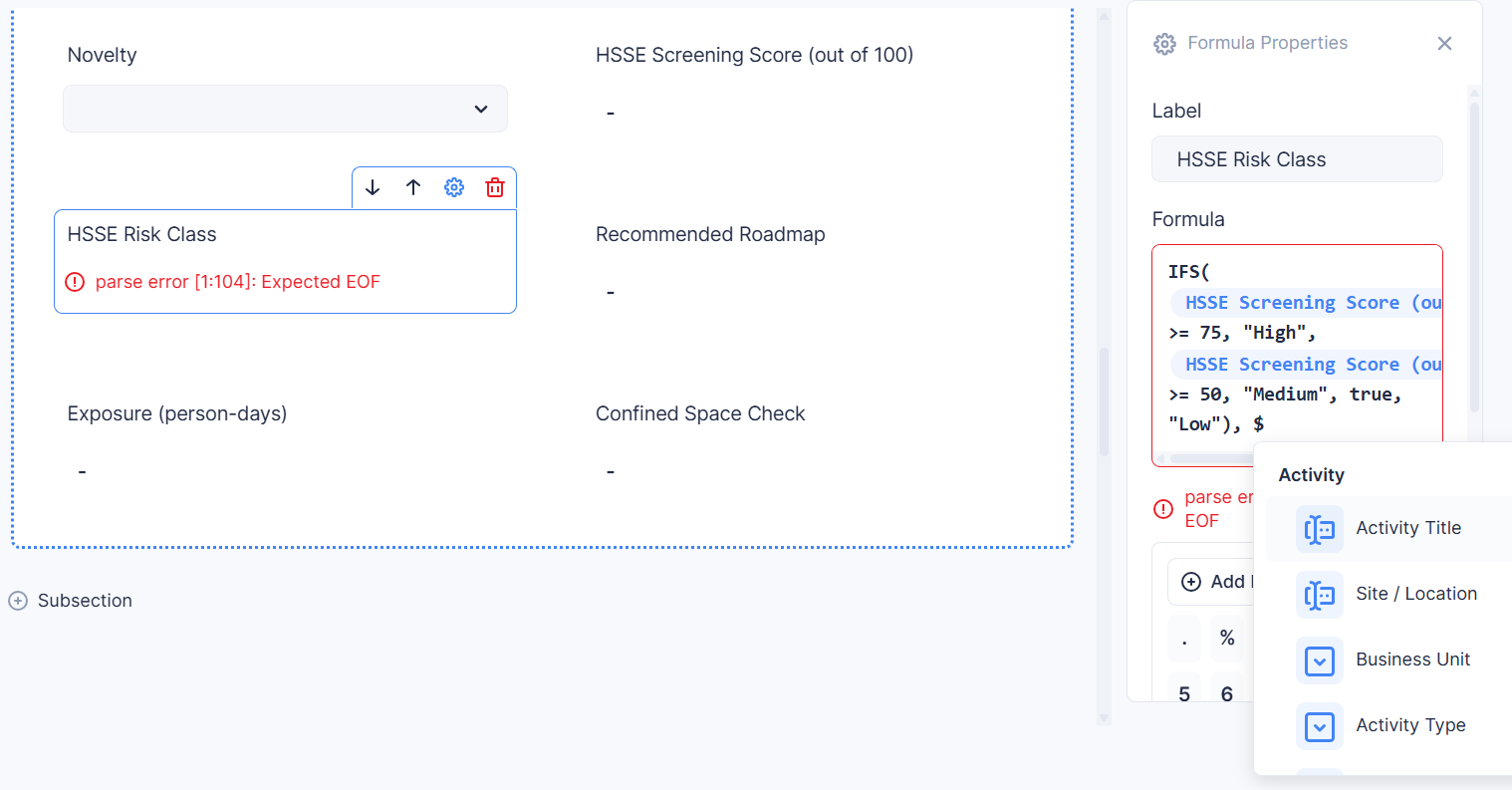
Type # in the Formula box. A list of functions appears, each with its inputs (for example ROUND(value, decimals)). Keep typing to filter it, then press Enter. The function is added with the cursor between its brackets, ready for you to fill in.
The list shows the function's name and inputs only. For what each one does, see the Function Reference on this page.
¶ Numbers, text, and operators
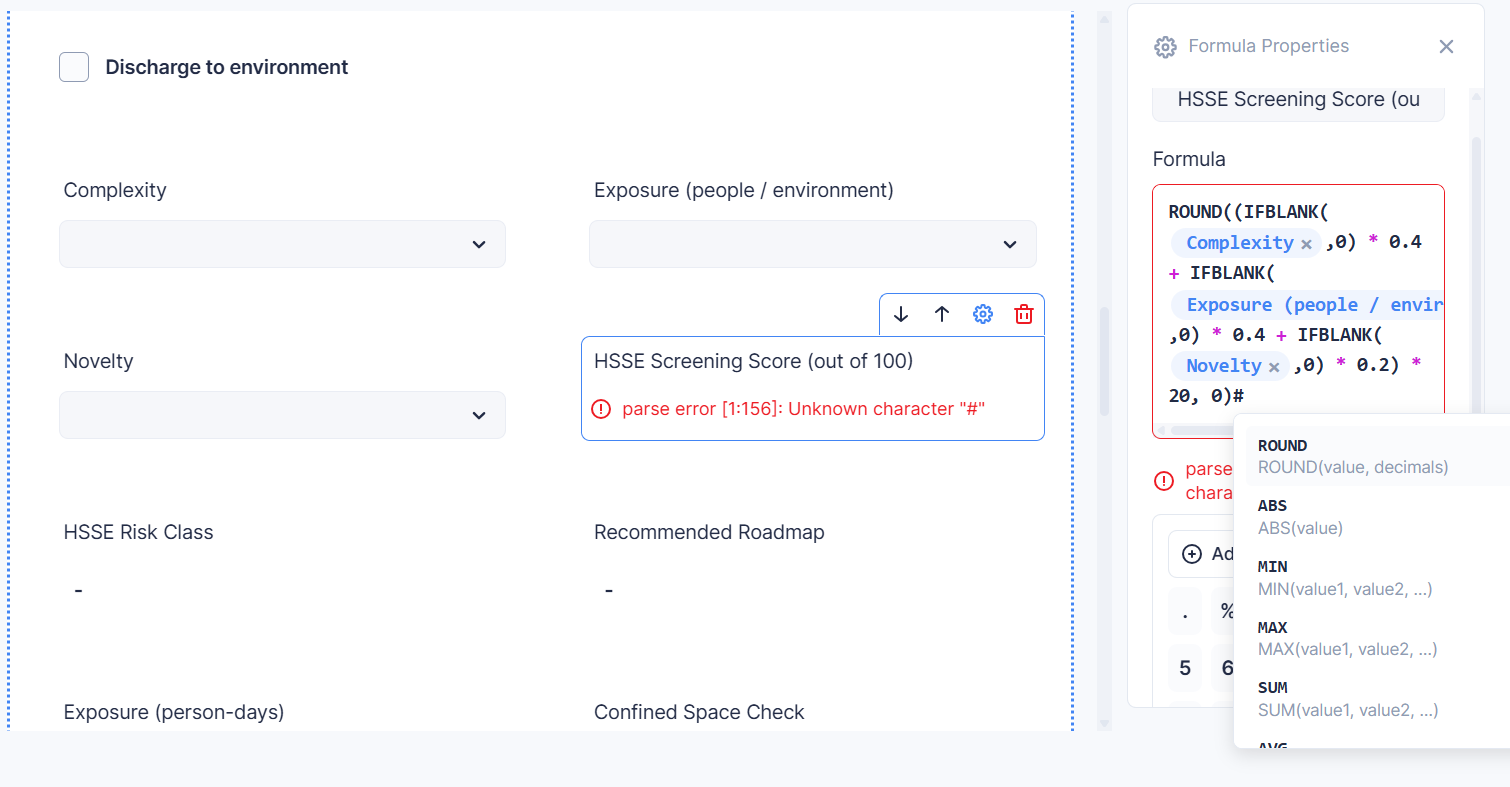
The keypad under the Formula box gives you numbers and the basic operators. You can also type everything directly.
| Type | How to write it | Example |
|---|---|---|
| Numbers | As normal, with a dot for decimals | 0.08 |
| Text | In double quotes | "High" |
| Yes / no | true or false |
IFS($Score >= 15, "High", true, "Low") |
| Add, subtract | + - |
$Subtotal + $Tax |
| Multiply, divide | * / |
$Quantity * $Unit Price |
| Power | ^ |
$Side ^ 2 |
| Remainder | % (what's left after dividing; not percent) |
$Units % 12 |
| Compare | == (equal), != (not equal), >, >=, <, <= |
$Score >= 15 |
| Combine conditions | and, or, not (or the functions AND, OR, NOT) |
$Score >= 15 and $Status == "Open" |
| Brackets | ( ) to control the order |
($Subtotal + $Shipping) * 0.08 |
Good to know:
+only adds numbers. To join text, useCONCAT.- The % key on the keypad means remainder, not percent. For percentages, divide (e.g.
$Done / $Total) and set Output Format to Percentage. - Subtracting one date from another doesn't give days. Use
DAYS(from, to). - Text must match exactly, including capitals:
$Status == "Open"is not the same as"open". - Multiplication and division happen before addition and subtraction, as usual. Use brackets when in doubt.
¶ Choose How the Result Looks
Output Format changes how the result is displayed. It doesn't change the calculation.
| Output Format | Use it for | The result | Shows as |
|---|---|---|---|
| Number (default) | Counts, scores, quantities, and text results | 1240.5 |
1,240.50 (2 decimal places) |
| Currency | Money | 1240.5 |
$1,240.50 |
| Percentage | Rates and ratios | 0.82 |
82% |
| Date | Calculated dates | ADDDAYS($Due Date, 14) |
30 Oct 2026 |
- Decimal Places applies to Number, Currency, and Percentage.
- Percentage multiplies by 100 for display, so write the formula as a fraction:
$Completed / $Total, not$Completed / $Total * 100. - Currency is shown in US dollars.
- Text results (such as High or Overdue) show as they are. Leave Output Format as Number.
- Yes/no results show as True or False.
¶ What a Formula Can Read
| Field type | What the formula sees | Tips |
|---|---|---|
| Input Field with Input Format Number | A number | Use this for anything you'll calculate with. |
| Input Field (other formats), Text Area | Text | Use with CONCAT, or compare with ==. |
| Dropdown, Single Select | The chosen option's Value (or its name if no Value is set), as text | Give every option a Value. See below. |
| Multi Select | The list of chosen options | Use COUNT or CONTAINS. |
| Date | A date | Use with DAYS, ADDDAYS, TODAY, and comparisons. |
| Formula | Its result | Build complex logic in steps. |
Formulas can't read: User Selector, File Upload, Rich Text, Content Block, Dependent Dropdown, Data Source Field, Divider, or Static Table. These don't appear in the field list.
Hidden fields can't be read. A field, section, or table set to Hidden doesn't appear in the field list, and a formula can't use it. Hidden table columns are never filled in, so they can't usefully feed a formula either. If a formula needs a value people shouldn't change, make the field Read-only instead.
Don't hide a Formula element. A hidden formula isn't recalculated when the form is saved.
¶ Using dropdowns in formulas
Dropdown and Single Select answers are read as text. To calculate with them:
- When you add each option, fill in its Value with a number, e.g. Rare →
1, Unlikely →2, up to Almost Certain →5. - Multiplying, dividing, adding, or subtracting turns the values into numbers:
$Likelihood * $Impactworks. - Don't compare a dropdown directly with
>or<. Text comparisons don't work like number comparisons. Calculate a score in one formula first, then compare the score in a second formula (see Recipe 2). - To match a specific answer, compare with its Value in quotes:
$Likelihood == "5".
¶ Formulas in Editable Tables
¶ A Formula column: one result per row
Use a Formula column when every row needs its own result, such as a line total.
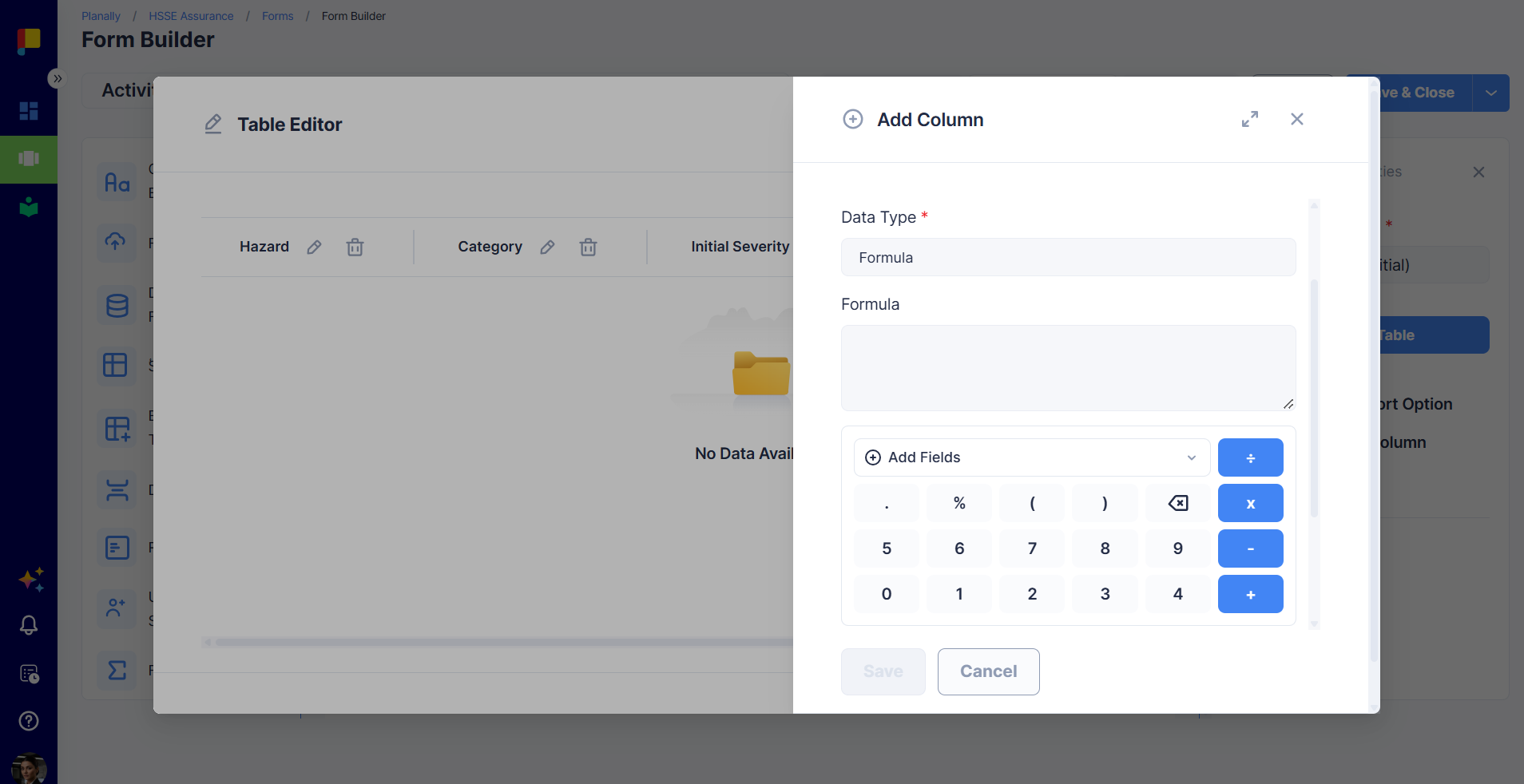
- Select the editable table and click Add Column.
- Enter a Column Name (e.g. Line Total) and choose Data Type: Formula.
- Write the Formula using the row's other columns. In the field list they're grouped under This row.
- Set Decimal Places and Output Format, then click Save.
Example: $Qty * $Unit Price
Only use the same row's columns in a Formula column. A column formula also can't total its own table. The field list also offers fields from the rest of the form, but a column formula that reads them won't save its result. If you need a form-level value in every row (such as a tax rate), calculate it outside the table instead.
Formula columns can read Input Field, Text Area, Date, Dropdown, Single Select, and other Formula columns in the same row. They can't read Multi Select, Dependent Dropdown, Attachment, or User Selector columns.
¶ Totals across a whole table
A Formula element outside the table can read a whole column: every row's value at once. When you insert a column, the chip shows Table › Column.
- Wrap the column in a function:
SUM($Line Items › Line Total),AVG(...),MIN(...),MAX(...),COUNT(...). - Multiplying two columns from the same table works row by row:
SUM($Line Items › Qty * $Line Items › Unit Price)multiplies each row's own quantity and price, then adds them up. - A column on its own, without a function, gives an error.
¶ Checking rows against a condition
You can't compare a whole column directly. $Actions › Due Date < TODAY() gives an error, because a column has many values. Instead:
- Add a Formula column that checks each row, e.g. Row Status =
IF($Due Date < TODAY(), "Late", "On Track"). - Outside the table, ask whether any row has that result:
IF(CONTAINS($Actions › Row Status, "Late"), "Has late actions", "All on track").
¶ Worked Examples
Each recipe lists the fields to add, then the formulas. Field names are examples; use your own.
¶ Recipe 1: Invoice totals
Fields: an editable table Line Items with columns Description (Input Field), Qty (Input Field, Number), and Unit Price (Input Field, Number). An Input Field Tax Rate (Number), e.g. 0.08.
| Where | Label | Formula | Output Format |
|---|---|---|---|
| Formula column in Line Items | Line Total | $Qty * $Unit Price |
Currency, 2 decimals |
| Formula element | Subtotal | SUM($Line Items › Line Total) |
Currency, 2 decimals |
| Formula element | Tax | ROUND($Subtotal * $Tax Rate, 2) |
Currency, 2 decimals |
| Formula element | Amount Due | $Subtotal + $Tax |
Currency, 2 decimals |
¶ Recipe 2: Risk score and rating
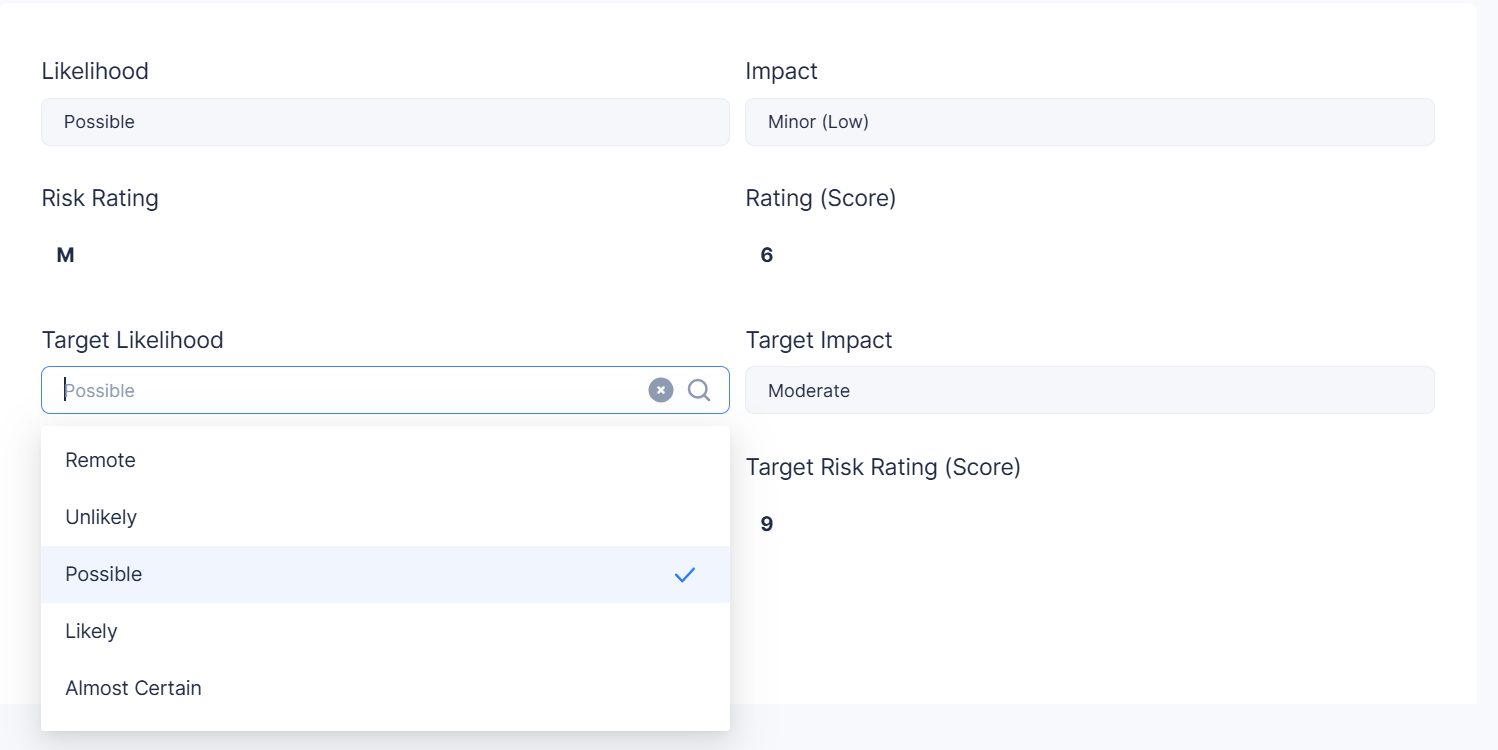
Fields: Dropdowns Likelihood and Impact, each with five options valued 1 to 5.
| Label | Formula | Output Format |
|---|---|---|
| Risk Score | $Likelihood * $Impact |
Number, 0 decimals |
| Risk Rating | IFS($Risk Score >= 15, "High", $Risk Score >= 8, "Medium", true, "Low") |
Number (shows the text) |
IFS checks each condition in order and stops at the first that's true, so put the most severe band first. The final true, "Low" catches everything else.
¶ Recipe 3: Days until due and an overdue flag
Fields: a Date field Due Date.
| Label | Formula | Output Format |
|---|---|---|
| Days Until Due | DAYS(TODAY(), $Due Date) |
Number |
| Due Status | IF($Due Date < TODAY(), "Overdue", IF($Days Until Due <= 7, "Due Soon", "On Track")) |
Number (shows the text) |
TODAY() is the date the form is saved. The result doesn't change by itself overnight: it updates the next time someone opens and saves the form. See When Formulas Calculate.
¶ Recipe 4: A follow-up date
Fields: a Date field Submitted On.
| Label | Formula | Output Format |
|---|---|---|
| Escalation Date | ADDDAYS($Submitted On, 14) |
Date |
| Review Year | YEAR($Submitted On) |
Number |
¶ Recipe 5: Score a checklist
Fields: a Multi Select Criteria Met, with one option per criterion.
| Label | Formula | What it does |
|---|---|---|
| Criteria Count | IF(ISBLANK($Criteria Met), 0, COUNT($Criteria Met)) |
How many were ticked (0 if none) |
| Weighted Score | IF(CONTAINS($Criteria Met, "Safety"), 40, 0) + IF(CONTAINS($Criteria Met, "Cost"), 30, 0) + IF(CONTAINS($Criteria Met, "Schedule"), 30, 0) |
Different weight per criterion |
For CONTAINS, use the option's Value if it has one, otherwise its name.
¶ Recipe 6: Roll up a table's status
Fields: an editable table Actions with a Dropdown column Status (options Open, In Progress, Done).
| Label | Formula |
|---|---|
| Actions Status | IF(ISBLANK($Actions › Status), "Not Started", IF(OR(CONTAINS($Actions › Status, "Open"), CONTAINS($Actions › Status, "In Progress")), "In Progress", "Complete")) |
ISBLANK handles the table having no rows yet. Without it, the formula shows - until the first row is added.
¶ Recipe 7: Percentage complete
Fields: Input Fields Completed and Planned (Number).
| Label | Formula | Output Format |
|---|---|---|
| Progress | IF($Planned == 0, 0, $Completed / $Planned) |
Percentage, 0 decimals |
The IF avoids dividing by zero when nothing is planned yet.
¶ Recipe 8: Build a reference code
Fields: Input Fields Area Code and Sequence.
| Label | Formula |
|---|---|
| Reference | CONCAT($Area Code, "-", $Sequence) |
¶ Function Reference
There are 29 functions. Type # in the Formula box to insert one.
¶ Maths
| Function | What it does | Example |
|---|---|---|
SUM(value1, value2, ...) |
Adds values, or every row of a table column | SUM($Line Items › Amount) |
AVG(value1, value2, ...) |
Average of values, or of a column | AVG($Score A, $Score B) |
MIN(value1, value2, ...) |
Smallest value | MIN($Quote 1, $Quote 2) |
MAX(value1, value2, ...) |
Largest value | MAX($Line Items › Amount) |
ROUND(value, decimals) |
Rounds to the given decimals | ROUND($Tax, 2) |
ROUNDUP(value, decimals) |
Rounds away from zero | ROUNDUP($Hours, 0) |
ROUNDDOWN(value, decimals) |
Rounds towards zero | ROUNDDOWN($Score, 0) |
FLOOR(value, multiple) |
Rounds down to a multiple | FLOOR($Price, 5) |
CEILING(value, multiple) |
Rounds up to a multiple | CEILING($Boxes, 10) |
ABS(value) |
Removes the minus sign | ABS($Variance) |
SQRT(value) |
Square root | SQRT($Area) |
POW(base, exponent) |
Raises to a power (same as ^) |
POW(1.05, $Years) |
Blank cells are skipped when SUM, AVG, MIN, and MAX read a table column.
¶ Logic
| Function | What it does | Example |
|---|---|---|
IF(condition, valueIfTrue, valueIfFalse) |
One of two results | IF($Amount > 10000, "Board", "Manager") |
IFS(condition1, value1, condition2, value2, ...) |
The first result whose condition is true. End with true, fallback |
IFS($Score >= 15, "High", true, "Low") |
SWITCH(expression, value1, result1, ..., default) |
Matches a value to a result | SWITCH($Size, "S", 1, "M", 2, "L", 3, 0) |
AND(condition1, condition2, ...) |
True if all are true | AND($Budget > 0, $Approved == "Yes") |
OR(condition1, condition2, ...) |
True if any is true | OR($Status == "Open", $Status == "Blocked") |
NOT(condition) |
Reverses true and false | NOT(ISBLANK($Owner Notes)) |
ISBLANK(field) |
True if the field has no answer | ISBLANK($Approval Date) |
IFBLANK(field, valueIfBlank) |
The field's value, or a fallback if it's empty | IFBLANK($Discount, 0) |
¶ Dates
| Function | What it does | Example |
|---|---|---|
TODAY() |
Today's date (when the form is saved) | TODAY() |
DAYS(from, to) |
Whole days from one date to another | DAYS($Start Date, $End Date) |
ADDDAYS(date, days) |
Moves a date forward (or back, with a negative number) | ADDDAYS($Due Date, -7) |
YEAR(date) |
The year | YEAR($Start Date) |
MONTH(date) |
The month, 1 to 12 | MONTH($Start Date) |
DAY(date) |
The day of the month, 1 to 31 | DAY($Start Date) |
¶ Text and lists
| Function | What it does | Example |
|---|---|---|
CONCAT(text1, text2, ...) |
Joins text, with nothing added between | CONCAT($First, " ", $Last) |
COUNT(field) |
How many options are ticked, or how many rows of a column have a value | COUNT($Criteria Met) |
CONTAINS(field, value) |
True if a Multi Select has that option ticked, or any row of a column holds that value | CONTAINS($Actions › Status, "Open") |
ISBLANK and IFBLANK need a field, not a calculation: IFBLANK($Discount, 0) works, IFBLANK($Discount * 2, 0) doesn't.
¶ When Formulas Calculate
- While someone fills in the form, results update as they type, so they can see the effect of each answer.
- When they click Save, Planally recalculates every formula on the server and saves the results. What's saved is always what the formula says, never a typed value.
- When the form is opened again, it shows the saved results until a field changes.
- Formulas don't recalculate on their own. A formula using
TODAY()(such as Days Until Due) shows the result from the last time the form was saved. It updates the next time someone saves the form. - Changing a formula in the Form Builder applies the next time each form or record is saved.
¶ Troubleshooting
| What you see | Why | What to do |
|---|---|---|
| - instead of a result | A field the formula reads is empty, or a table has no rows yet | Fill in the field, or handle it with IFBLANK($Field, 0) or IF(ISBLANK($Field), ..., ...). |
A field is missing from the $ list |
It's a type formulas can't read, it's hidden, or it would make the formula depend on itself | Check What a Formula Can Read. Use Read-only instead of Hidden. |
| Unknown field "…" | The field was deleted, renamed in a way that broke the link, or is hidden | Remove the chip and insert the field again with $. |
| Unknown function "…" | A typo in the function name | Use # to insert functions instead of typing them. |
| "…" expects N argument(s), got M | Too many or too few inputs | Check the function's inputs in the Function Reference. IFS takes pairs. |
| A table column needs a function such as SUM around it | A whole column is used on its own | Wrap it: SUM($Table › Column). |
| "…" is a whole table column, so "<" cannot answer for it | A column is compared with <, >, or == |
Use a Formula column per row, then CONTAINS (see Checking rows). |
| A field with several answers cannot be compared | A Multi Select is compared with == |
Use CONTAINS($Field, "Option"). |
| "…" and "…" belong to different tables | Columns from two tables are combined row by row | Total each table first, then combine the totals. |
| The result isn't a number | Text was used in a calculation | Use Number-format Input Fields, and give dropdown options numeric Values. |
| The result is infinite | Something was divided by zero | Guard it: IF($Planned == 0, 0, $Done / $Planned). |
| No IFS branch matched | None of the conditions were true | End IFS with true, "fallback". |
| "…" needs a date | A date function was given something that isn't a date | Use a Date field, or a formula with Output Format Date. |
| A rating comparison gives the wrong band | A dropdown is compared with > or < as text |
Calculate a score first, then compare the score (Recipe 2). |
| A Formula column's result disappears after saving | The column formula reads a field outside its own row | Only use This row columns in a Formula column. |
A TODAY() result is out of date |
Formulas recalculate only when the form is saved | Open and save the form to refresh it. |
¶ Best Practices
- Plan the calculation on paper first: which fields, which steps, which result.
- Build in steps. Several simple formulas (Score, then Rating) are easier to check than one long one.
- Put each formula right after the fields it reads, so people see the result change as they answer.
- Use Number-format Input Fields for anything you'll calculate, and give every dropdown option a Value.
- Always end
IFSwithtrue, …so there's always a result. - Handle empty fields on purpose with
IFBLANKorISBLANK; a blank is never treated as zero. - Use Read-only, not Hidden, for helper fields and columns a formula needs.
- Test in Preview with typical values, empty values, and extreme values (zero, very large) before saving.
- Avoid changing a field's type on a form that's already in use. Add a new field instead.